> For the complete documentation index, see [llms.txt](https://docs.himaxwell.com/llms.txt). Markdown versions of documentation pages are available by appending `.md` to page URLs; this page is available as [Markdown](https://docs.himaxwell.com/platform-overview/admins-and-tech-support/integrations/loan-origination-systems-los/encompass/updating-api-connection.md).
# Updating API Connection
### API User Update
Once ICE has provided Maxwell the API Client ID, we'll forward it to you. It is needed in Step 5 below.
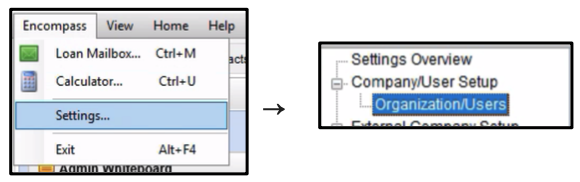
1. While using a super admin account, go to Encompass menu and choose Settings. Then navigate to Company/User Setup > Organization/Users:
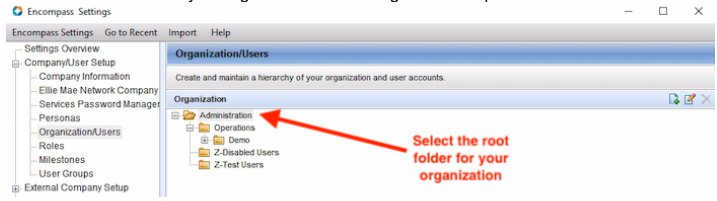
 2. Select the root folder for your organization in the Organizations panel:
 3. In the lower (Users) panel, locate the "Maxwell\_api\_user" user
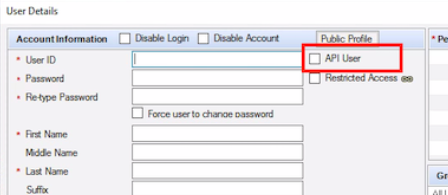
4. In the User Details window, in the left panel, select the API User check box. This hides the password fields and reveals the API Client ID field:
 5. Enter the API Client ID supplied by Maxwell
6. Double check following values in the remaining required fields:
* **User ID**: maxwell\_api\_user
* **First Name**: Maxwell
* **Last Name**: API User
* **Email**:
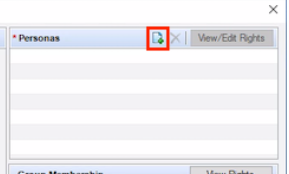
7. **Double check the assigned persona--we require the Super Administrator persona be assigned to the API user.** This would have been configured during initial setup, but it's a good idea to double check it. The Super Administrator persona cannot be moved from the top level of the organization. This ensures api access to all loans for the organization, and prevents potential breaking changes caused by moving the api user between levels of the organization. **No additional personas should be applied to the user.** For instance, the user should not have both the Super Administrator and a Loan Officer personas applied. \
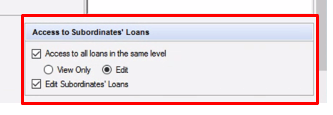
8. Finally, double check the access permissions for the API user. By default, Encompass users can only access loans assigned to them. In order for the API user to be able to interact with loans across the Maxwell team, the following must be checked/enabled:
* Access to all loans at the same level
* Edit must be selected
* Edit Subordinates' Loans\
5. Enter the API Client ID supplied by Maxwell
6. Double check following values in the remaining required fields:
* **User ID**: maxwell\_api\_user
* **First Name**: Maxwell
* **Last Name**: API User
* **Email**:
7. **Double check the assigned persona--we require the Super Administrator persona be assigned to the API user.** This would have been configured during initial setup, but it's a good idea to double check it. The Super Administrator persona cannot be moved from the top level of the organization. This ensures api access to all loans for the organization, and prevents potential breaking changes caused by moving the api user between levels of the organization. **No additional personas should be applied to the user.** For instance, the user should not have both the Super Administrator and a Loan Officer personas applied. \

8. Finally, double check the access permissions for the API user. By default, Encompass users can only access loans assigned to them. In order for the API user to be able to interact with loans across the Maxwell team, the following must be checked/enabled:
* Access to all loans at the same level
* Edit must be selected
* Edit Subordinates' Loans\
