# User Management

## Adding Users to Maxwell Mortgage Intelligence <a href="#adding-users-to-maxwell-mortgage-intelligence-0" id="adding-users-to-maxwell-mortgage-intelligence-0"></a>

To add a new user:

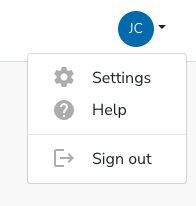
1. As an Organization Administrator, in the user dropdown, select **Settings**:\
   ![](https://static.helpjuice.com/helpjuice_production/uploads/upload/image/9040/direct/1682086226149-1682086226149.png)<br>
2. In the left navigation panel, choose **Users**.\
   \
   If you do not see Users, you are not an Organization Administrator. If you would like to add additional Administrators to your account, please send a request to <help@himaxwell.com>.\ <br>
3. Select **Add User**:\
   ![](https://static.helpjuice.com/helpjuice_production/uploads/upload/image/9040/direct/1682087212410-1682087212410.png)<br>
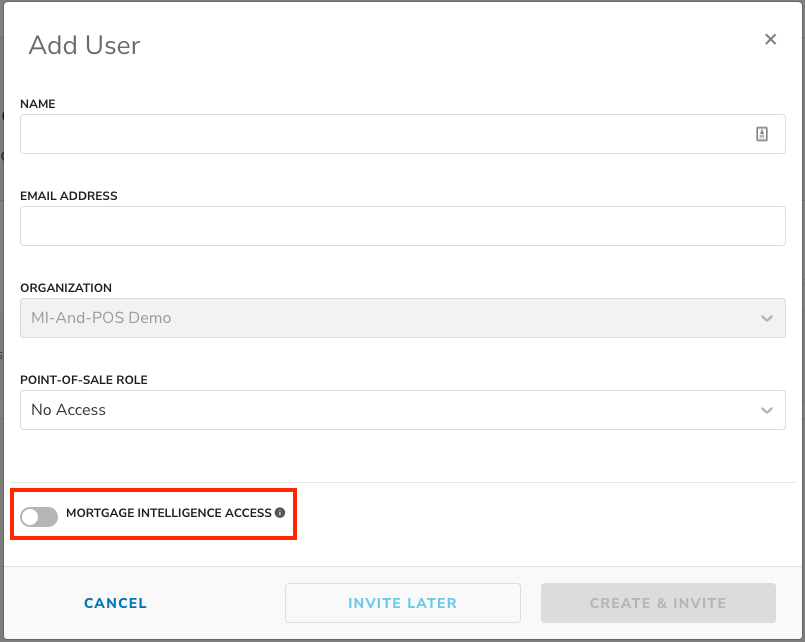
4. (Maxwell Point-of-Sale Customers Only) Enable the Mortgage Intelligence Access toggle:\
   ![](https://static.helpjuice.com/helpjuice_production/uploads/upload/image/9040/direct/1664900622486-1664900622486.png)
