# Troubleshooting Encompass eDisclosure packages

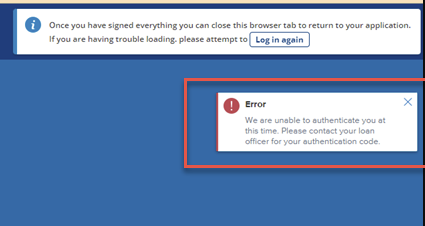
The Encompass eDisclosure package can become locked if the borrower enters their password or authentication code incorrectly. When this occurs, the borrower will see an error that the they are not able to authenticate.

<figure><img src="https://2622734615-files.gitbook.io/~/files/v0/b/gitbook-x-prod.appspot.com/o/spaces%2F-MNeX8nmtEPnFygumL_k%2Fuploads%2Fe1yNMhJXVGcb8rYbsqg7%2Fimage.png?alt=media&#x26;token=8ffffbe8-c859-4a88-a974-f5bb98edc909" alt=""><figcaption></figcaption></figure>

The package can be unlocked by issuing the privacy policy from the eFolder.

### Steps:

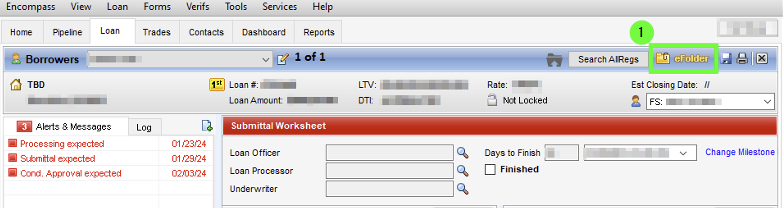
1. First, navigate to the eFolder on the loan in question

<figure><img src="https://2622734615-files.gitbook.io/~/files/v0/b/gitbook-x-prod.appspot.com/o/spaces%2F-MNeX8nmtEPnFygumL_k%2Fuploads%2FadZoFu6wzzXu7O8qJVDT%2Fimage.png?alt=media&#x26;token=ebb73d42-00fd-4b05-b8a5-a5ef23949b4f" alt=""><figcaption></figcaption></figure>

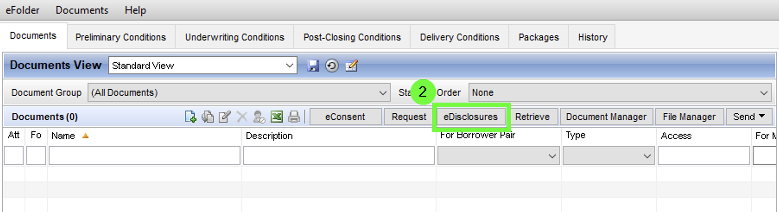
2. Next, select eDisclosures

<figure><img src="https://2622734615-files.gitbook.io/~/files/v0/b/gitbook-x-prod.appspot.com/o/spaces%2F-MNeX8nmtEPnFygumL_k%2Fuploads%2FME9jaYzDeVif5iB3qesN%2Fimage.png?alt=media&#x26;token=c8b6ea11-d1ad-42bc-a54e-37d9234f6c46" alt=""><figcaption></figcaption></figure>

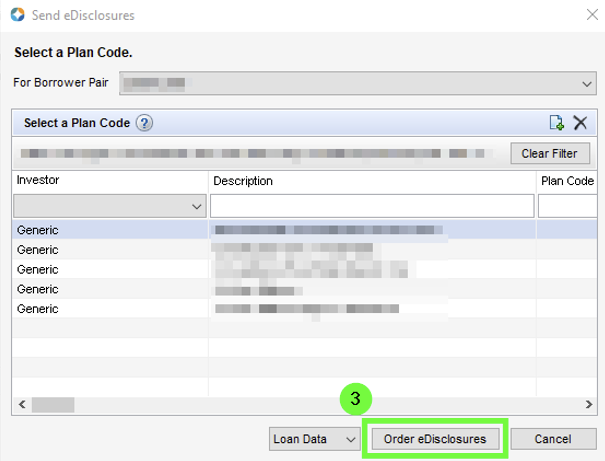
3. Click "Order eDisclosures"

<figure><img src="https://2622734615-files.gitbook.io/~/files/v0/b/gitbook-x-prod.appspot.com/o/spaces%2F-MNeX8nmtEPnFygumL_k%2Fuploads%2FIZWbVUh1fP5ApDrK0wG7%2Fimage.png?alt=media&#x26;token=84e768c4-c41e-4097-b351-a6e00d8f94c0" alt=""><figcaption></figcaption></figure>

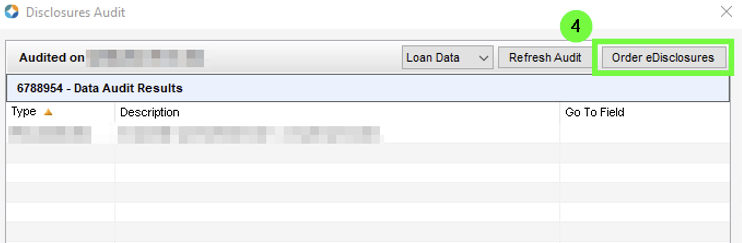
4. Click "order eDisclosures" in the following window

<figure><img src="https://2622734615-files.gitbook.io/~/files/v0/b/gitbook-x-prod.appspot.com/o/spaces%2F-MNeX8nmtEPnFygumL_k%2Fuploads%2F6ZA3JbmeMSzgKOcmfjtk%2Fimage.png?alt=media&#x26;token=2f60a3c9-4474-4463-ab20-815e432bf23e" alt=""><figcaption></figcaption></figure>

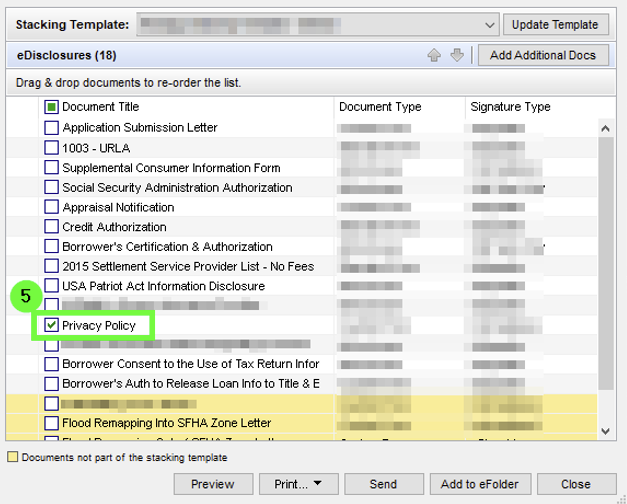
5. Select the Privacy Policy

<figure><img src="https://2622734615-files.gitbook.io/~/files/v0/b/gitbook-x-prod.appspot.com/o/spaces%2F-MNeX8nmtEPnFygumL_k%2Fuploads%2FjpuTIWHOLauWFUnx8oUS%2Fimage.png?alt=media&#x26;token=65f2978c-91b7-4b63-b957-905ad96adc1a" alt=""><figcaption></figcaption></figure>

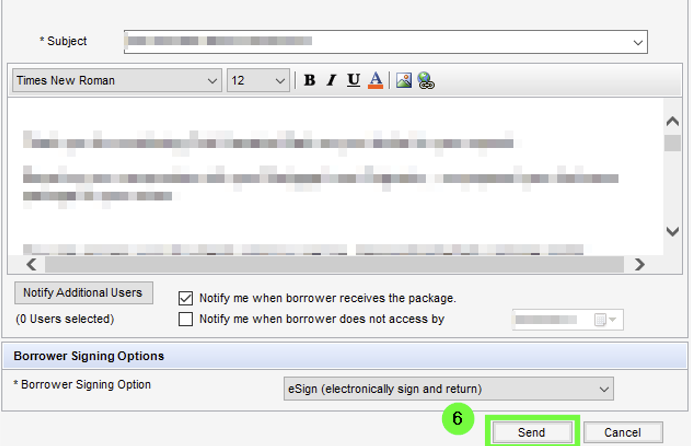
6. Click Send to issue the privacy policy

<figure><img src="https://2622734615-files.gitbook.io/~/files/v0/b/gitbook-x-prod.appspot.com/o/spaces%2F-MNeX8nmtEPnFygumL_k%2Fuploads%2FnnfYNmVhiupyqppVXA19%2Fimage.png?alt=media&#x26;token=9fb045a0-e234-4166-ac41-85676549d50c" alt=""><figcaption></figcaption></figure>

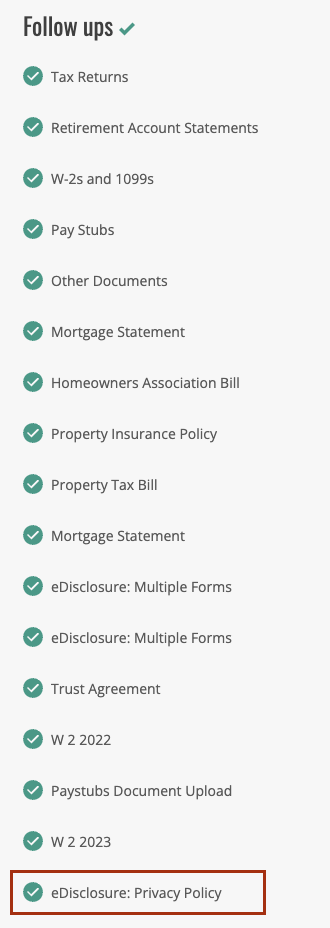
You will know this process has been sucessful when the Privacy Policy appears in the follow-up tasks in the borrowers application. The borrower can not attempt to authenticate again and sign the original disclosure package.
<figure><img src="https://2622734615-files.gitbook.io/~/files/v0/b/gitbook-x-prod.appspot.com/o/spaces%2F-MNeX8nmtEPnFygumL_k%2Fuploads%2FwKMoL7CY7ubfUZIIBXuu%2Fimage.png?alt=media&#x26;token=8a6c93c8-b8a0-4033-925c-3812de1802e7" alt=""><figcaption></figcaption></figure>