# Private Mortgage Insurance

## Summary

* [Overview ](#overview)
* [How It Works ](#how-it-works)
* [Screengrab Workflow](#mock-workflow)
* [MI Providers Supported](#mi-providers-supported)
* [MI Product Types Supported](#mi-product-type-selections-available)
* [Enabling the MI Quotes Integration](#enabling-the-mi-quotes-integration-beta)

## Overview

Maxwell’s MI integration allows LOs to retrieve real-time mortgage insurance quotes from all six supported PMI providers, directly within the Point of Sale (POS) so they can shop for the best rate for borrowers. This enables accurate pricing and streamlined borrower pre-qualification.

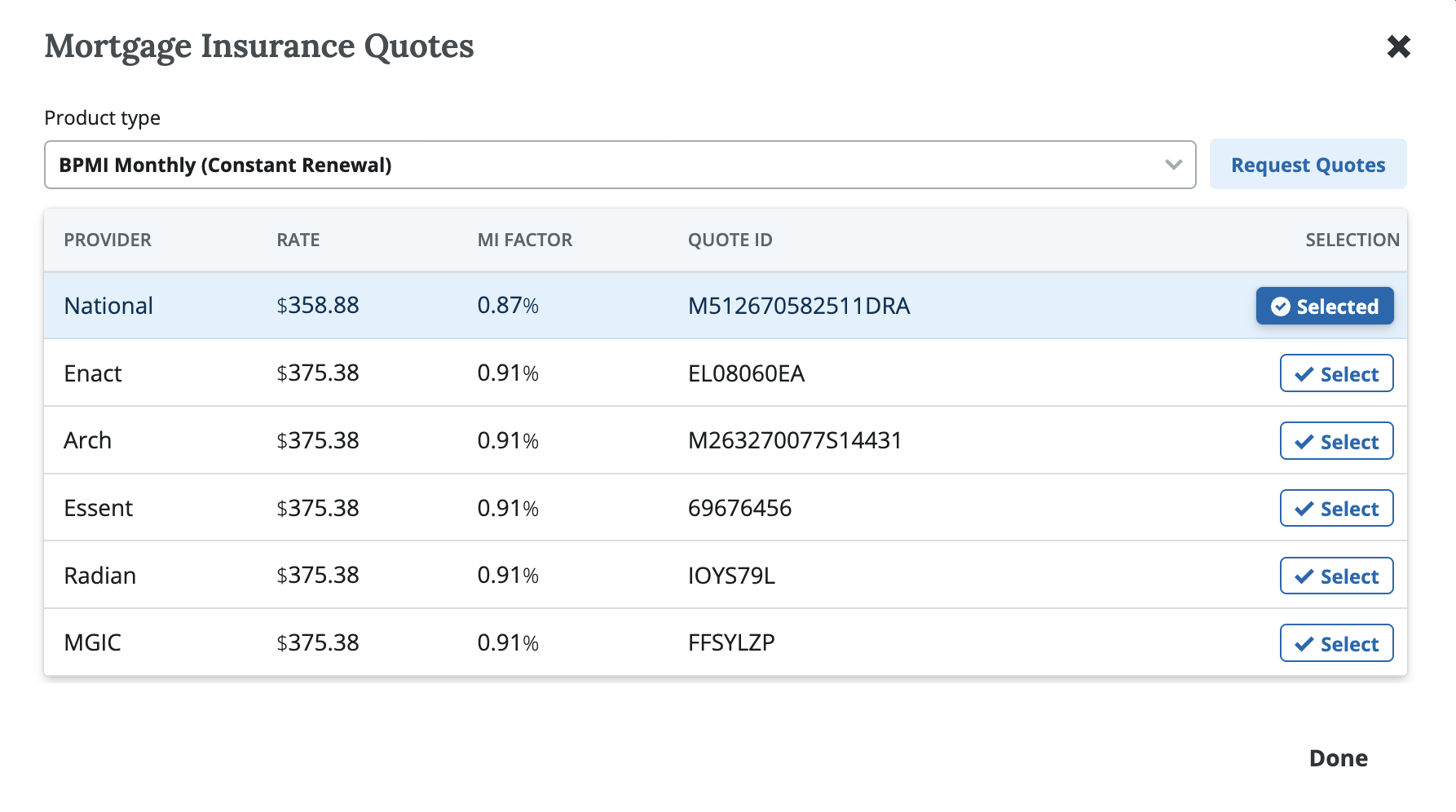
<figure><img src="https://2622734615-files.gitbook.io/~/files/v0/b/gitbook-x-prod.appspot.com/o/spaces%2F-MNeX8nmtEPnFygumL_k%2Fuploads%2FhaJ4dFqMG6bEHhliwgN9%2FScreenshot%202025-05-06%20at%201.36.26%E2%80%AFPM.png?alt=media&#x26;token=f899c41d-6a3c-4a25-8301-d25bad763ace" alt=""><figcaption><p>Get real time price quotes from your providers and select the best option for your borrower. </p></figcaption></figure>
### How It Works&#x20;

* **Setup (**[**see more details below**](#enabling-the-mi-quotes-integration)**)**&#x20;
  1. Client provides **master policy numbers** for each MI partner.
  2. MI vendors **provision access** for the lender for the POS.&#x20;
  3. Maxwell Admins **set up the integration** and the policy numbers in POS admin
* **Requesting MI Quotes (in Lender Hub)**
  1. Create a loan file with **LTV > 80%**.
  2. Navigate to the **Loan Products** tab and select an agency loan.
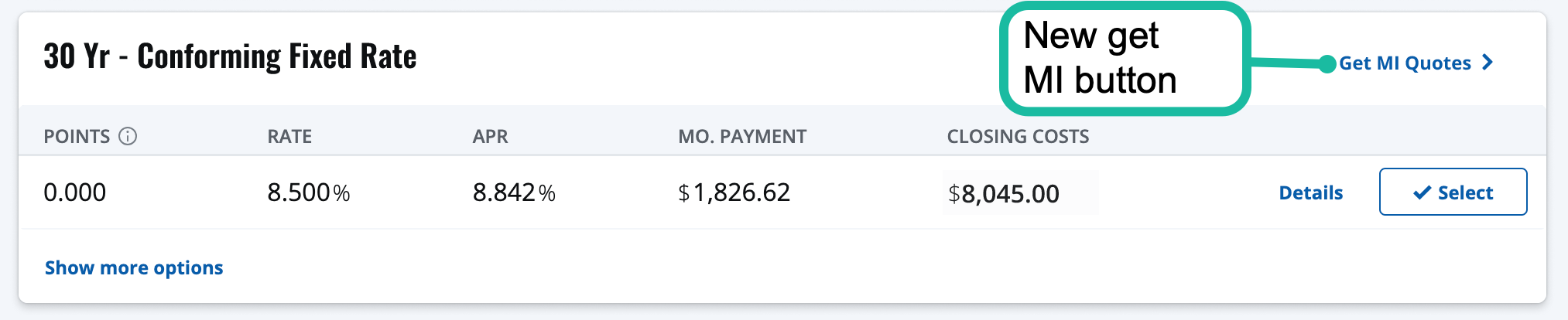
  3. Click **“Get MI Quote”** (button appears only when MI is required).
  4. In the quote window:
     * Select MI product type (e.g., *Borrower Paid Monthly*).
     * Click **Request Quote**.
     * Review and select your preferred quote.
  5. Updated MI pricing displays:
     * In the upper-right corner of the product card.
     * Throughout the POS (e.g., pricing summary, pre-qual letters, AUS).
     * **PDF copy** of the selected quote is stored in the **Doc Vault**.

### Screengrab Walkthrough

<figure><img src="https://2622734615-files.gitbook.io/~/files/v0/b/gitbook-x-prod.appspot.com/o/spaces%2F-MNeX8nmtEPnFygumL_k%2Fuploads%2FCaybV2FSV3c4GaIPjzoi%2FScreenshot%202024-09-23%20at%2011.00.06%E2%80%AFAM.png?alt=media&#x26;token=373a5566-8c6c-4441-974e-2987322891ed" alt=""><figcaption><p>New Get MI button will be available on selected loan products where MI is required.</p></figcaption></figure>

<figure><img src="https://2622734615-files.gitbook.io/~/files/v0/b/gitbook-x-prod.appspot.com/o/spaces%2F-MNeX8nmtEPnFygumL_k%2Fuploads%2FhaJ4dFqMG6bEHhliwgN9%2FScreenshot%202025-05-06%20at%201.36.26%E2%80%AFPM.png?alt=media&#x26;token=f899c41d-6a3c-4a25-8301-d25bad763ace" alt=""><figcaption><p>Get real time price quotes from your providers and select the best option for your borrower. </p></figcaption></figure>

<figure><img src="https://2622734615-files.gitbook.io/~/files/v0/b/gitbook-x-prod.appspot.com/o/spaces%2F-MNeX8nmtEPnFygumL_k%2Fuploads%2F2xatXtgiRPprYXm9axck%2FScreenshot%202025-05-06%20at%201.36.02%E2%80%AFPM.png?alt=media&#x26;token=9d8c32a9-5f7e-43d4-8662-0d210e0843d2" alt=""><figcaption><p>Select which product type you would like in the request quote dropdown.</p></figcaption></figure>

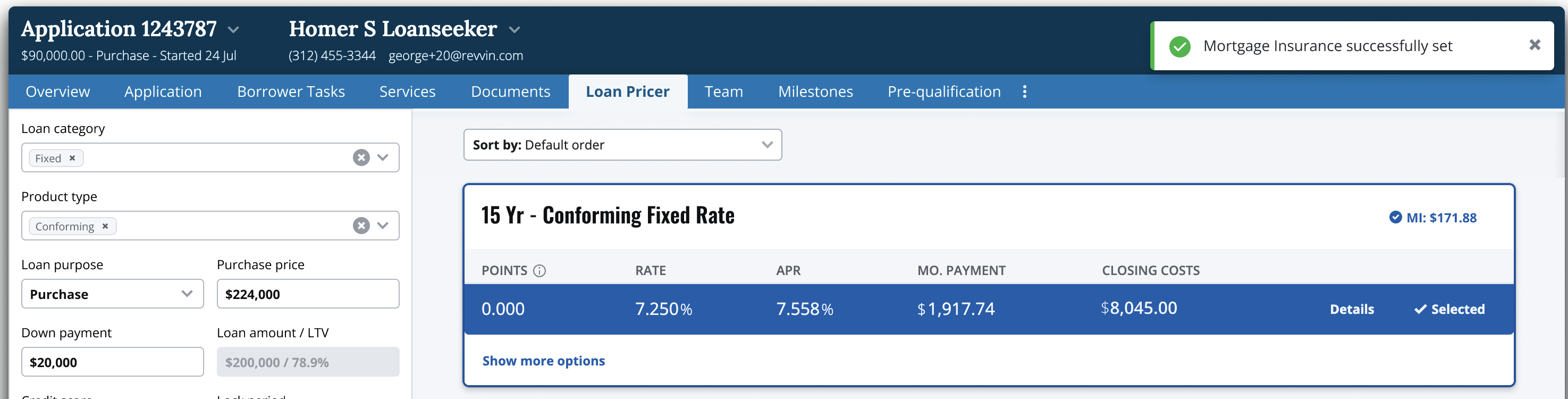
<figure><img src="https://2622734615-files.gitbook.io/~/files/v0/b/gitbook-x-prod.appspot.com/o/spaces%2F-MNeX8nmtEPnFygumL_k%2Fuploads%2FZWkig2rCr5eeFwWxvqpY%2FScreenshot%202024-10-25%20at%2011.35.15%E2%80%AFAM.png?alt=media&#x26;token=f9de0c1d-319c-44d4-94bd-dd8aee2099d1" alt=""><figcaption><p>Selected MI will display where the Get MI button was previously. You can click on it again to change your MI selection. </p></figcaption></figure>
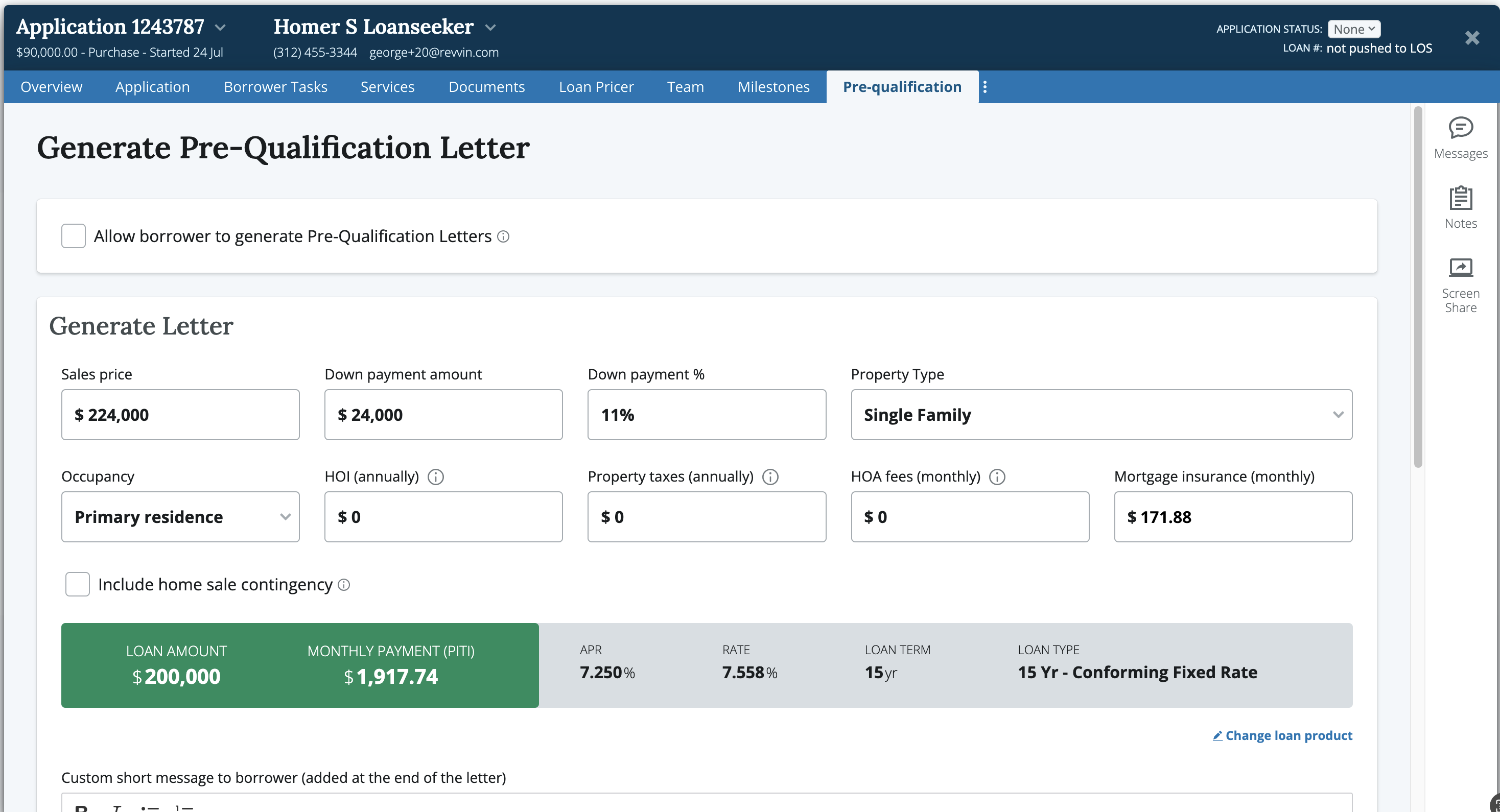
<figure><img src="https://2622734615-files.gitbook.io/~/files/v0/b/gitbook-x-prod.appspot.com/o/spaces%2F-MNeX8nmtEPnFygumL_k%2Fuploads%2FkSyCTFENXY35jLjUAZOP%2FScreenshot%202024-10-25%20at%2011.35.43%E2%80%AFAM.png?alt=media&#x26;token=5f8be56b-d14c-4c03-b885-af8113c162b6" alt=""><figcaption><p>MI selection will automatically map into other applicable areas of the POS: Pre-qual letters, AUS, and Monthly Payment</p></figcaption></figure>

### Enabling the MI Quotes Integration&#x20;

1. Email **<help@himaxwell.com>**
   1. **Subject line:** `MI Integration`
   2. **Include in body:**
      * Lender name
      * Head office address
      * Master policy number(s) for each MI partner
2. Maxwell will help coordinate provisioning with the MI provider (see contacts list below)
3. Maxwell Implementation and Engineering complete the integration setup&#x20;
4. Maxwell will testing to verify everything is working.
5. Lender will user test to confirm results are what they are expecting&#x20;

### MI Providers Supported&#x20;

<table><thead><tr><th width="207.3984375">Provider</th><th width="162.80078125">Contact Name</th><th>Email</th></tr></thead><tbody><tr><td>Arch</td><td>Will Vickers</td><td>wvickers@archmi.com</td></tr><tr><td>Enact</td><td>Jordan Steffaniak</td><td>Jordan.Steffaniak@enactmi.com</td></tr><tr><td>Essent</td><td>Mike Sudol</td><td>mike.sudol@essent.us</td></tr><tr><td>National MI</td><td>Simon Atwood</td><td>simon.attwood@NationalMI.com</td></tr><tr><td>MGIC</td><td>Jim Bartz</td><td>jim_bartz@mgic.com</td></tr><tr><td>Radian</td><td></td><td><a href="mailto:ClientConnectivitySupportInbox@radian.com">ClientConnectivitySupportInbox@radian.com</a></td></tr></tbody></table>

### MI Product Type Selections Available

At quote time, lenders can choose from supported options via dropdown:

* **BPMI Monthly – Constant Renewal**
* **BPMI Monthly – Declining Renewal**
* *(LPMI and BPMI Single options may be supported depending on integration scope)*

{% hint style="warning" %}
Note: Split payment options are not currently supported through Maxwell, but can be handled externally in your LOS or with the MI provider directly.
{% endhint %}